


iParkit Garage Parking
4.4451.00 Reviews
App Specs
- Version
- 4.3.20
- Updated On
- License
- Free
- Downloads
- 100,000+
- Developer
- InterPark
- Categories
- Maps & Navigation
- Platform
- Android
Screenshots
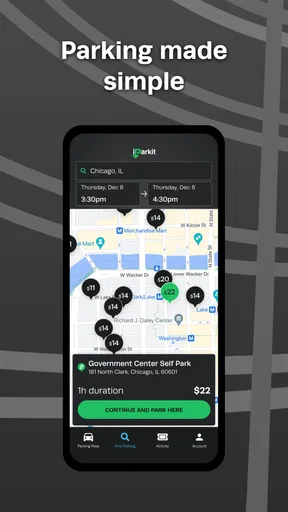
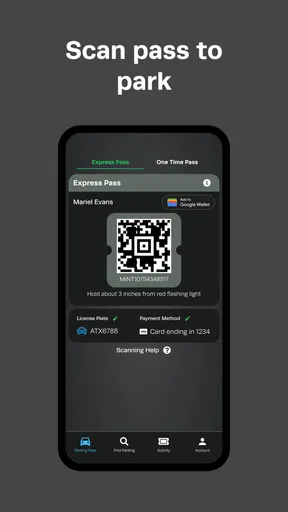
 Analysis by AppCompare
Parking apps usually promise to remove the most annoying part of driving downtown: circling the same blocks while watching the clock. After spending time with iParkit Garage Parking, I found that its value is more practical than flashy. It is a focused Maps & Navigation app from InterPark, built around the simple job of helping drivers deal with garage parking. It will not replace every navigation tool on your phone, but it can make a familiar urban routine more organized when you use it as part of a repeatable plan rather than opening it only after frustration has already set in.
The app is free and suitable for Everyone, which makes it easy to try before deciding whether it fits your driving habits. It has been available since March 31, 2016, and the current version is 4.3.20. Its average rating is 4.4 from around 3.5 thousand ratings, with more than 100 thousand installs. Those figures suggest a useful level of adoption without turning the app into something I would blindly trust for every parking decision. My experience is that its best role is a dedicated parking companion: use it to narrow down where to leave the car, then use sensible judgment about your route, timing, and the garage itself.
How I use iParkit from planning to leaving the car
I use iParkit as one step in a larger trip plan, not as a substitute for my regular navigation app. I first decide what kind of arrival will make the visit easiest, then compare garage locations with the approach streets and the walk to my destination in mind. Once I have a choice, I keep the garage name and a nearby landmark in mind before leaving the car; that small habit makes the return trip easier, and it leads naturally to the setup checks I use before relying on the app.
The baseline workflow works best before the last street corner
The most reliable way to use the app is to begin before you are already in heavy traffic. When I know I am heading downtown, I treat parking as part of the trip instead of a final emergency. I open iParkit Garage Parking early, look for a suitable garage near the destination, and decide whether the extra walking distance is acceptable. That small change in timing matters because choosing a garage while moving slowly through crowded streets is much harder than comparing options while still parked or preparing to leave.
I would not use it as a replacement for a full navigation app. A general map app is usually better for the complete journey, traffic context, and turn-by-turn driving. iParkit is more useful at the point where the question changes from “How do I reach downtown?” to “Where should I leave the car once I get there?” Keeping those jobs separate makes the experience less confusing. I use my normal navigation tool for the approach and the parking app for the final parking decision.
For a realistic weekday example, imagine that I have an appointment downtown and want to avoid arriving late after searching for a space. Before leaving, I check the destination area in iParkit and select a garage that appears practical rather than automatically choosing the closest one. I then note the nearby street or landmark mentally, start the main route in my usual navigation app, and return to the parking information when I am close. This gives me a destination I can recognize instead of making me improvise at the busiest moment.
That workflow also answers an important question: is this app useful if I already have Google Maps or Apple Maps? Yes, but only if you want a more parking-centered step in the process. General map apps can show parking-related places, yet their broader interface may make it harder to focus on garages as the actual endpoint. iParkit earns its place when parking is the main problem you are trying to solve, not when you simply need another general-purpose map.
Worth Reading Before You Choose

EA SPORTS FC Mobile 26 Is a Bigger Football Game, but It Takes Time

Flipboard Shows What News Apps Must Do Beyond the Feed

Switching to Android Auto Means Rethinking Your Driving Routine

Google Calendar Makes a Crowded Week Easier to Manage

Ludo King Makes the Most of the Minutes Between Plans

Baby Panda World Brings Quick Play to Modern Phones, but Its Game Library Feels Busy
Choosing a garage is a trade-off, not a race to the nearest pin
The nearest result is not automatically the best result. A garage one block closer may leave me approaching from the wrong direction, forcing a difficult turn or an extra loop around a one-way street. A slightly farther option may be easier to reach and less stressful, especially during a busy event or a time-sensitive appointment. I use the app to create a short list, then compare each option with the actual shape of the surrounding streets and the place I need to visit.
This is one of the less obvious habits that makes the app more useful: I judge the final approach, not just the distance on the screen. If the destination is on the opposite side of a divided road, a garage that looks close may produce a longer walk than expected. If I am carrying luggage, traveling with someone who walks slowly, or arriving after dark, a straightforward entrance and a clear walking route can matter more than a tiny difference in map distance.
I also avoid making the app responsible for assumptions it cannot make for me. A listed garage may be convenient geographically, but my decision still depends on the reason for the trip, how long I expect to stay, and whether I am comfortable walking from that location. The app helps reduce the search; it does not remove the need to read the situation around the destination.
What I check before relying on a result
Before committing to a garage, I look at its position relative to the destination and the direction from which I will arrive. I also check that I have selected the intended place rather than tapping a nearby result by mistake. This sounds basic, but it prevents a common failure in parking workflows: choosing a location that is technically close while overlooking the entrance streets that make it inconvenient.
I keep the app open long enough to understand the selected result, then switch back to my driving tool if I need active directions. That is safer and more comfortable than repeatedly changing apps while moving. My rule is simple: make the parking decision before the complicated part of the drive, and use the phone only in a way that does not distract from the road.
Settings and phone habits worth checking
There is no benefit in treating every setting as something that must be changed. I first check the phone’s location permission and system location switch, because a parking app cannot be useful if it cannot establish where I am. I also make sure the app is updated to the current version, 4.3.20, before an important trip. That is not a guarantee that every situation will be perfect, but it removes an avoidable source of trouble.
I pay attention to notification behavior as well. If the app sends information I want to see before driving, I allow those notifications; if they become distracting, I adjust them at the phone level rather than letting alerts interrupt the trip. I prefer a quiet screen while driving and do my comparison work before starting the car. This is especially important because a parking tool is most helpful when it reduces mental load, not when it adds another stream of interruptions.
Battery and connectivity are practical parts of the setup. I start with enough battery for the entire journey and avoid assuming that a live map will behave perfectly in every underground garage or weak-signal area. If I have already chosen a location, I remember its name and nearby street before entering. That habit gives me a fallback if the signal becomes unreliable after I park, when I may need to find the pedestrian exit or return to the car later.
Another useful setting-related habit is keeping the app’s role clear. I do not constantly leave it running just because it is a navigation app. I open it when I am planning or comparing parking, then close or background it when the task is finished. This keeps the workflow cleaner and avoids making the phone feel like it is managing the whole journey for me.
Faster patterns for repeat trips
Experienced use is less about tapping quickly and more about repeating a good sequence. For places I visit often, I begin with the destination area rather than waiting until I am already downtown. I compare the same practical factors each time: approach direction, walking distance, and whether the garage is a sensible match for the purpose of the visit. After a few trips, I can make the choice faster because I am evaluating the same questions instead of browsing randomly.
A helpful shortcut is to separate “arrival parking” from “return parking.” On the way in, I care about reaching the appointment or venue with minimal stress. On the way out, I care about remembering where I left the car and getting back to the main road without confusion. Before walking away, I note the garage name, the street, and a nearby landmark. I do not rely on memory alone, particularly in large downtown areas where several entrances can look alike.
For a short visit, I may prefer the garage with the simplest walking route. For a long visit, I am more willing to accept a slightly longer walk if the approach is easier. This is a concrete trade-off that a generic parking search does not solve automatically. The best result changes with the trip, and iParkit is most effective when I use its map information as the starting point for that judgment.
I also prepare an alternative before leaving. If my first choice is awkward to reach or appears unsuitable when I arrive, I do not want to begin searching from scratch in traffic. I select a backup area or garage during planning and keep the destination context in mind. This does not require a special feature; it is simply a better workflow. The app makes that comparison easier because the parking options are the focus of the screen.
Where the app reaches its limits
The biggest limitation is that a parking map cannot predict every real-world condition. A garage can be busy, its entrance can be temporarily difficult to reach, or the surrounding streets can be affected by construction, events, or restrictions. I therefore treat a result as a planning aid rather than a promise that a space will be waiting for me. Anyone who needs guaranteed availability should look for a service specifically designed around reservations or confirmed inventory instead of expecting this app to provide certainty.
I am also cautious about relying on it for a complete route. Its narrow focus is a strength when I am comparing garages, but it is a weakness if I expect detailed traffic guidance, public transit planning, cycling directions, or a full multimodal itinerary. In those cases, a broader maps application is the better primary tool. I would use iParkit alongside it, not instead of it.
Another limit is the human interpretation still required at the last step. A map pin does not tell me everything about the entrance lane, the most convenient pedestrian exit, or how comfortable the walk will feel for my group. I inspect the surrounding streets and keep the destination’s actual entrance in mind. This is particularly important for hospitals, theaters, offices, and large venues, where the closest garage to the building may not be closest to the door I need.
Drivers who rarely park downtown may find the app unnecessary. If I am visiting a small town, already know a reliable lot, or have a private parking arrangement, opening a dedicated parking app adds little. Likewise, people who want one application to handle every part of a journey may prefer a general navigation platform. iParkit makes more sense for drivers who repeatedly face garage decisions and want a focused tool for that specific problem.
Privacy, safety, and practical expectations
Because this is a location-based navigation app, I use it with the same common-sense care as any map service. I check location access on my phone, avoid interacting with the screen while driving, and make decisions before reaching complicated intersections. The Everyone content rating makes it approachable for a broad audience, but age suitability does not change the need for safe phone habits behind the wheel.
I also avoid treating the app as a substitute for observing signs at the garage entrance. Street signs, temporary instructions, and on-site directions are the final authority when I arrive. If the route suggested by the map conflicts with a visible restriction, I follow the restriction. This is a small but important distinction: the app can help me choose where to aim, while the road environment determines how I actually enter.
My verdict after building a repeatable routine
iParkit Garage Parking is a focused free app that I would recommend to drivers who regularly head downtown and want to make garage selection less improvised. Its strongest quality is not that it turns parking into a completely automatic task. Instead, it gives the parking part of the journey its own attention, which helps me plan earlier, compare locations more deliberately, and avoid wasting time circling without a clear alternative.
The app is especially useful when I combine it with a few habits: check the destination before leaving, compare approach streets rather than only distance, prepare a backup, and record the garage location before walking away. Those habits expose the app’s real value. It becomes a repeatable planning tool rather than a last-second search screen. The best results come from using the app before the stressful part of the drive begins.
I would choose a general map app instead when I need full route guidance, traffic context, or several transportation modes in one place. I would look for a reservation-focused parking service when guaranteed availability is essential. But for the narrower job of finding and thinking through downtown garage parking, this app has a clear purpose. InterPark has kept the experience centered on that purpose, and the long availability of the app, along with its solid user response, makes it an easy option to test.
My final recommendation is therefore measured but positive. If you often arrive downtown with no parking plan, install it and build a simple routine around it. If you already know exactly where you park or rarely drive into dense areas, you may not notice much benefit. For everyone in between, iParkit Garage Parking can turn an irritating search into a manageable part of the trip—as long as you remember that a map can guide the decision, while good timing and attention finish the job.
Pros
- Shows garage availability and rates before you arrive.
- Lets you reserve parking in advance at supported locations.
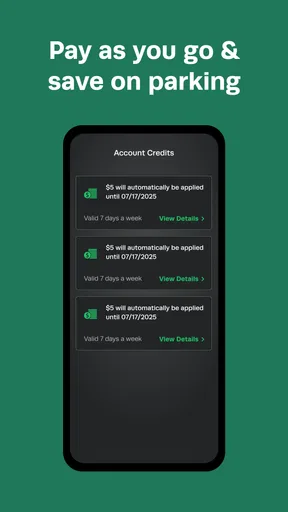
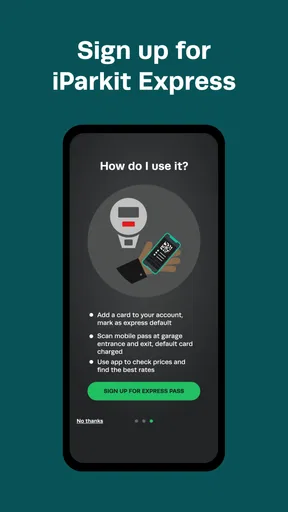
- Mobile payment reduces the need for cash or ticket machines.
- Helpful location details make unfamiliar garages easier to find.
- Digital parking records simplify expense tracking and receipts.
Cons
- Coverage is limited to participating garages and selected cities.
- Availability data may change before you reach the garage.
- Reservations can have restrictions or cancellation conditions.
- Location access is needed for the best parking search experience.
- App usefulness depends on garages accepting mobile entry or payment.
FAQs for iParkit Garage Parking
What is iParkit Garage Parking, and how does it work?
iParkit Garage Parking is a mobile parking service designed to help drivers find and use participating parking garages and lots. After installing the app, you can search for available locations, review garage details, compare prices when information is provided, and follow directions to your selected facility. Depending on the location, the app may also support reservations, digital entry, or mobile payment.
Can I reserve and pay for a parking space through iParkit Garage Parking?
In supported garages, iParkit may allow you to reserve parking in advance and pay through the application. However, available features can vary by city, garage, operating hours, and local agreements. Before confirming a reservation, check the displayed price, parking duration, cancellation rules, taxes, and any additional fees. Some facilities may still require payment at an onsite machine or attendant.
How accurate are the prices, availability, and garage information in the app?
The app provides useful information such as garage addresses, operating hours, rates, restrictions, and available services, but parking details can change quickly. Prices may differ during events, peak periods, or special promotions, while availability can change between viewing a location and arriving there. Always review the final booking information and follow the garage’s posted rules.
Does iParkit Garage Parking provide directions and help with entering the garage?
iParkit can help you locate a participating garage and may connect with your phone’s mapping service for navigation. The app may also display entrance information, height limits, operating hours, and instructions for using a reservation or digital access feature. Because entrances can be difficult to identify in busy areas, verify the exact address and follow onsite signs when you arrive.
What should I do if I need to cancel a reservation or experience a parking problem?
If your plans change, open the reservation or booking section in the app and review whether cancellation or modification is available. Refund eligibility depends on the garage’s policy and the timing of your request. For issues such as a failed payment, incorrect charge, inaccessible space, or difficulty entering, save your receipt and contact iParkit support or the garage directly using the provided contact details.


